
OC Editor
Change one thing about your character and keep the rest: upload your art or pick a saved OC, describe the change, a new pose, an expression, a hair color, an accessory, and AI redraws the same character with it.
Change a detail of your character
Your character
What should change?
At a glance
- Output: your character with the change you described, in the same shape as the image you started from. Cost per image: 10 credits, or 6 with High quality off.
- You describe the change in your own words: sitting cross-legged, winking, silver hair, round glasses. The full prompt is shown before you generate and can be edited.
- Only what you ask for changes: the prompt tells the AI to keep the same design, colors, outfit, hairstyle, face and art style, and to keep everything else the same.
- Starts from an image: upload a drawing of your character (imported as-is, free) or pick one you've saved. An edit needs a picture to edit.
- Every result is saved under the character as an edit, and any of them can become the character's main image.
- New accounts get 20 free credits, valid for 30 days. Failed generations don't use credits.
Made with DrawMyOC
One real character, three edits made on this site: a new pose, a new expression with a prop, and a new look. Open “Prompts” to read the exact text that made each image.
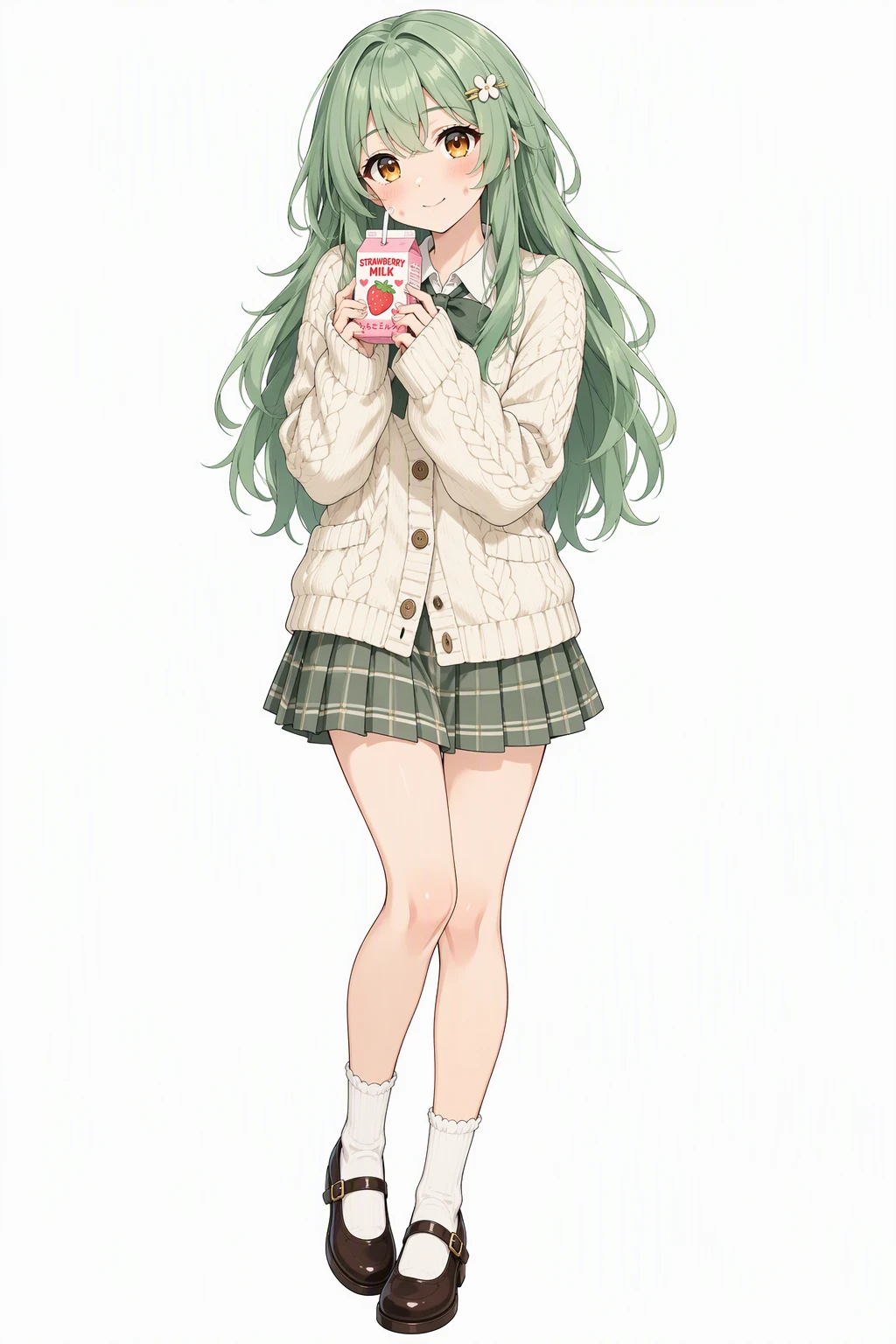 Character
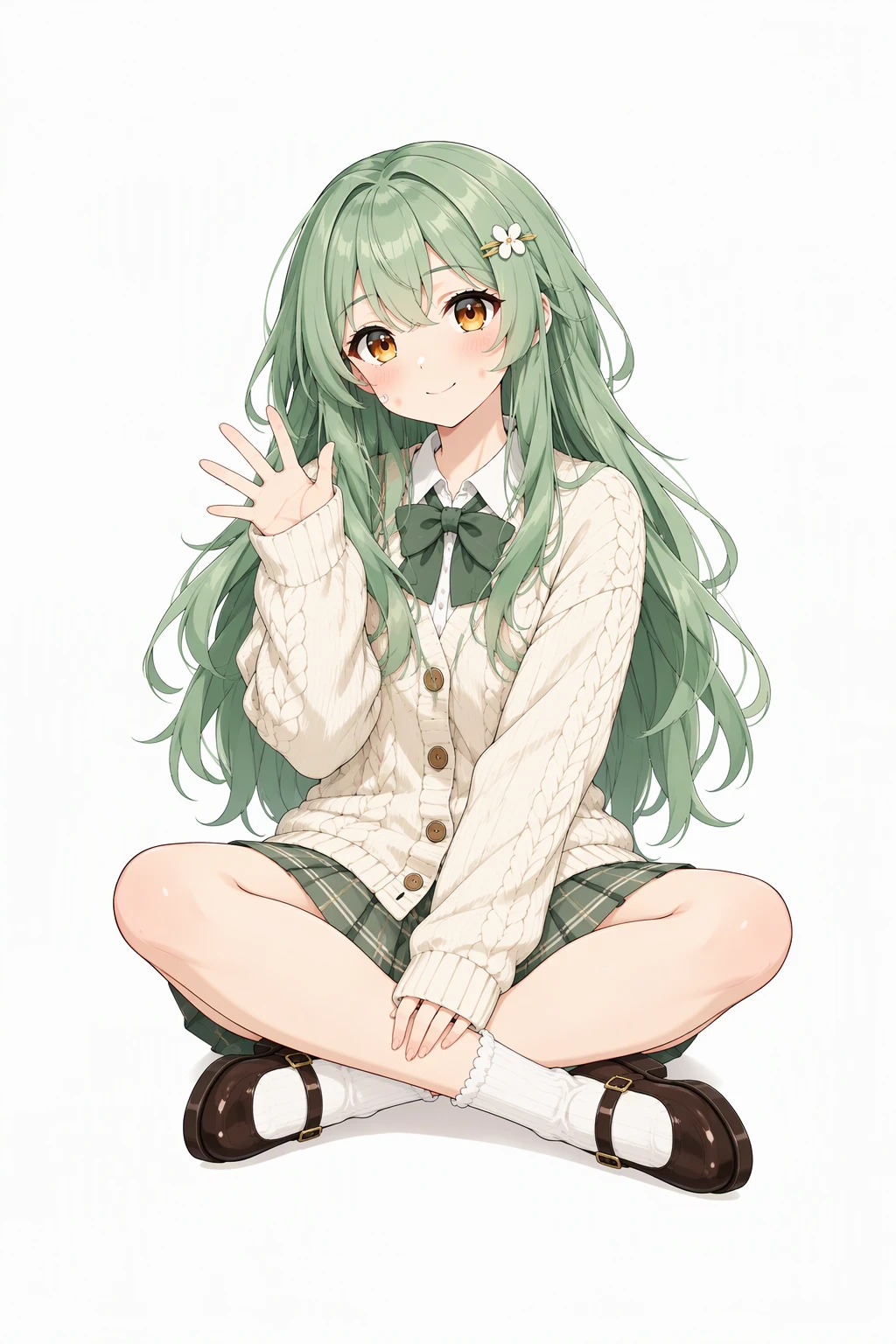 After the change
Prompts
Character: Vibrant anime illustration with clean line art, cel shading and expressive large eyes. A cheerful young woman with long layered mint-green hair, warm amber eyes and dimpled fair cheeks, wearing a cream knitted cardigan over a pleated skirt with Mary Janes and a small hair clip, holding a strawberry milk carton with a shy soft smile. Single character, full body, clean white background.
Change (with the character as reference): Same character as the reference image. Keep the exact same design, colors, outfit, hairstyle, face and art style. Change only this: Sitting cross-legged on the floor, waving at the viewer. Keep everything else the same.
Character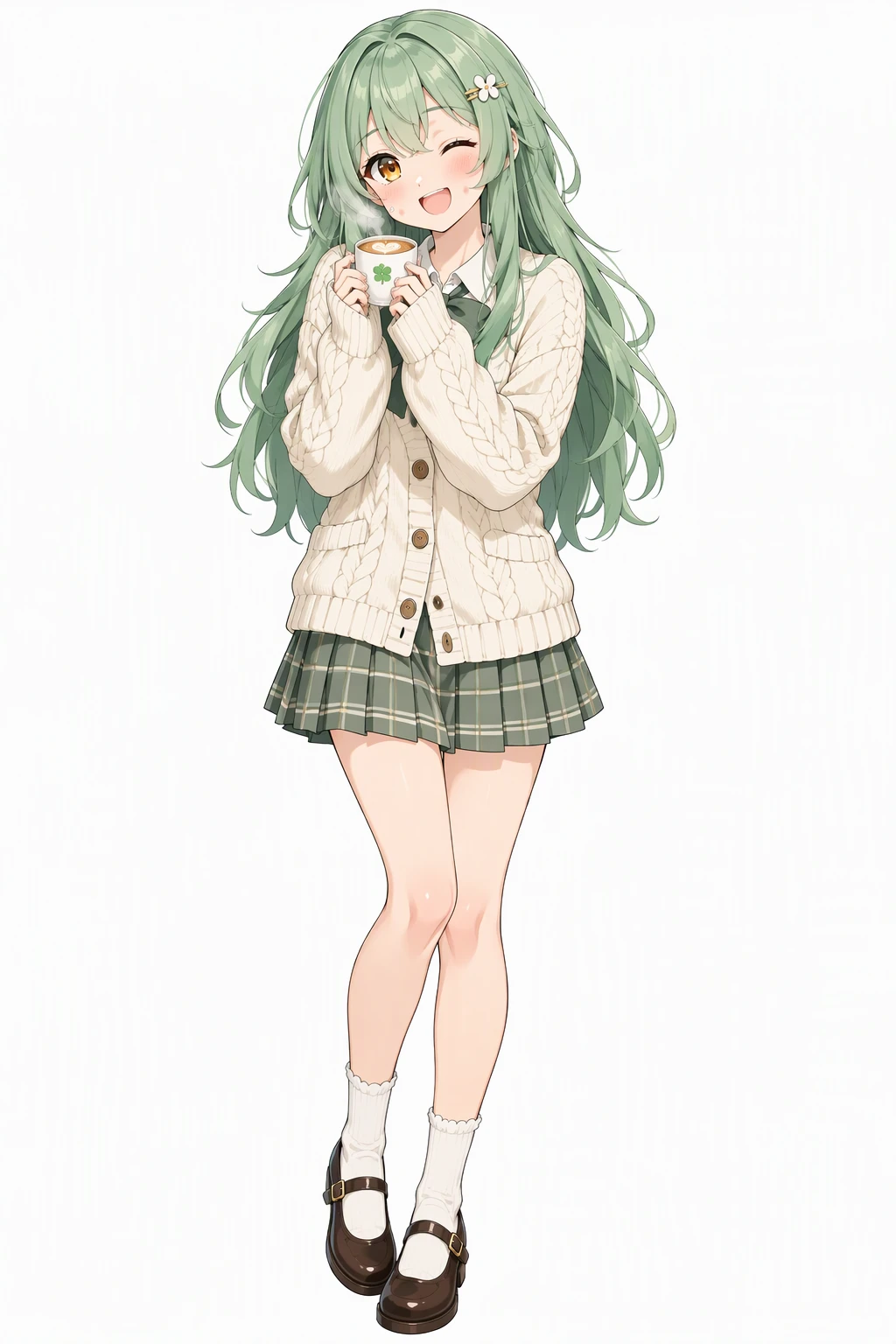 After the change
Prompts
Character: Vibrant anime illustration with clean line art, cel shading and expressive large eyes. A cheerful young woman with long layered mint-green hair, warm amber eyes and dimpled fair cheeks, wearing a cream knitted cardigan over a pleated skirt with Mary Janes and a small hair clip, holding a strawberry milk carton with a shy soft smile. Single character, full body, clean white background.
Change (with the character as reference): Same character as the reference image. Keep the exact same design, colors, outfit, hairstyle, face and art style. Change only this: Winking with a big smile, holding a cup of coffee. Keep everything else the same.
Character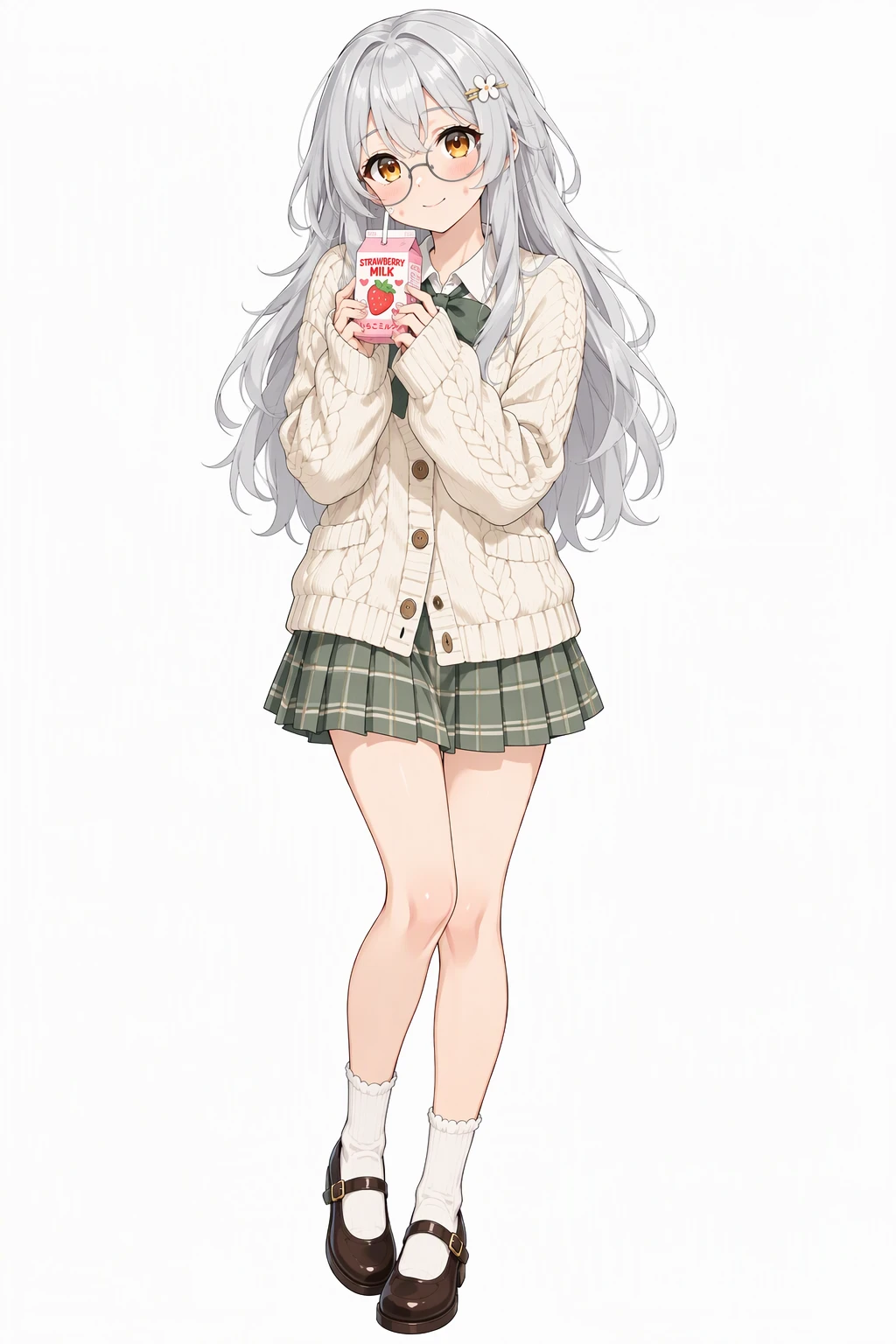 After the change
Prompts
Character: Vibrant anime illustration with clean line art, cel shading and expressive large eyes. A cheerful young woman with long layered mint-green hair, warm amber eyes and dimpled fair cheeks, wearing a cream knitted cardigan over a pleated skirt with Mary Janes and a small hair clip, holding a strawberry milk carton with a shy soft smile. Single character, full body, clean white background.
Change (with the character as reference): Same character as the reference image. Keep the exact same design, colors, outfit, hairstyle, face and art style. Change only this: Make her hair silver and add round glasses. Keep everything else the same.
How to edit your OC
Add your character
Upload a drawing of your OC or pick one you've saved. Full-body art gives a pose change the most to work with.
Describe the change
Type what should change, or tap an idea such as a new pose or a different expression to fill the box and edit it. One edit per image works best.
Generate and download
Download the image. It is also saved in your character's library under Edits, next to the original.
An OC editor that changes one thing and keeps the rest
Redrawing a character to change one detail usually changes five others. This editor is built around a single instruction: change only this, keep everything else the same. You describe the change in a sentence, and the same character comes back with it, in the same art style.
It works on art you upload as well as characters made here. The original is never overwritten; each edit is a new image saved beside it, so you can try three hair colors and keep the one you like.
Edit the pose
A new pose is the most common edit. Describe what the body is doing and the same character comes back in that pose, with the same face, hair and outfit.
Edits that work well as a description: sitting cross-legged on the floor, waving at the viewer; leaning against a wall with arms crossed; looking back over one shoulder; crouching to tie a shoe; stretching with both arms above the head. Add what the hands are doing and where the eyes are looking; those two details change a pose more than anything else.
Edit the expression, hair or accessories
The same box takes any small edit. An expression: winking with a big smile, pouting, laughing with eyes closed. A look: silver hair, a shorter cut, heterochromia. An accessory or a prop: round glasses, a scarf, a cup of coffee in one hand, a cat on the shoulder.
For a whole new outfit, the OC Outfit Generator is the better fit: it keeps the body and changes all the clothes at once. For a set of expressions on one sheet, the Discord Sticker Maker and the Twitch Emote Maker draw six together, and the PNGtuber Maker makes four matching frames for streaming.
OC Editor FAQ
Is this OC editor free?
Each edit costs 10 credits, or 6 with High quality off. New accounts get 20 free credits that last 30 days. Uploading your art is free.
Will my character still look the same after an edit?
The prompt asks the AI to keep the same design, colors, outfit, hairstyle, face and art style, and to change only what you described. It is still a new drawing, so small details can shift. Check the result, and edit the prompt to call out anything it missed.
Can I make several changes at once?
You can write more than one in the box, for example silver hair and round glasses. The more you ask for in one image, the more likely something else shifts, so one change per image is the safer way.
Can I use a pose reference image?
No. The change comes from your description; the one image you add is the character. Describe the pose in words: what the arms and legs are doing and where the character is looking.
Can I edit a character I haven't drawn yet?
Not here; an edit needs an image to start from. Create the character on the homepage first, then pick it under My OCs.
Does it work on photos?
This editor is built for drawn characters. Photos of real people are often refused by the image model's safety filter. If a generation fails, it doesn't use credits.
Can I edit a Gacha or Picrew OC here?
Yes. Upload a screenshot or the saved image of your Gacha or Picrew character, then describe the change. The AI redraws the character with that change, so the result is a new drawing, not an edit of the original file. If you plan to post it, check what the original maker allows.
No character yet?
Describe one and DrawMyOC draws it, then keeps every token, sticker and sheet you make from it in one library.